2.3 Arithmetic & Indexing
: 40 minutes
Now that we know how to create new tensors or NumPy arrays, let us talk about some of the vectorized operations we can perform on them.
Arithmetic Operations
Any arithmetic operations between equal-size arrays apply the operation element-wise as show below:
Arithmetic operations with scalars is also element-wise:
Array of equal size can also be compared element-wise. The output is a boolean array of same size.
Basic Indexing
We use indexing for viewing a subset of a NumPy array. NumPy indexing can be an extremely involved topic. For this course, we touch upon only some of the basic indexing techniques.
The most basic indexing resembles indexing of a Python list.
The above can also be used to edit an array, by assigning a scalar into the selected subset. Note that the scalar is broadcast across the whole slice:
WarningArray slices are views
This is the single most consequential difference between a NumPy array and a Python list, and it is the source of more silent bugs than anything else in the library.
Slicing a list gives you a new list. Slicing an array gives you a view: a second label on the same block of memory, differing only in how it is read. Consequently, writing through a slice writes through to the original array.
Compare the two directly:
The array printed [0 1 999 3 4 5]. Nothing about the syntax warned you.
CautionAssigning a name is not mutating an array
There is a trap one level below this, and it is a Python trap rather than a NumPy one:
Here A is unchanged, because A_slice = -10 simply points the name A_slice at the integer -10. To write into the array you must index it:
name = value rebinds. name[...] = value mutates. Keep them apart in your head and half of the confusion in this section evaporates.
When you want a genuine, independent duplicate, ask for one with .copy() (equivalently numpy.copy()):
Telling views from copies
You do not have to guess. np.shares_memory answers the question directly, and .base names the array a view was carved from:
The rule to remember:
| Operation | Result |
|---|---|
basic slicing, A[1:4], A[::2], A[0] |
view |
reshape, .T, swapaxes, np.newaxis |
view |
fancy (integer-array) indexing, A[[0, 2]] |
copy |
boolean-mask indexing, A[A > 0] |
copy |
explicit .copy(), A + 0, A.astype(...) |
copy |
Views are not a wart; they are why NumPy is fast. Slicing a 10 GB array costs nothing because nothing is duplicated. The price is that you must know which side of that table you are on before you write into something.
ImportantWhy this bites in practice
A function that modifies its array argument in place will modify the caller’s data:
If that is not what you meant, copy at the top of the function: x = x.copy(). Deciding, deliberately, whether a function mutates or returns a fresh array is part of writing usable code.
For higher-dimensional arrays or tensors, we supply nested (equivalently, comma-separated) index arguments to reach an individual element.
Advanced Indexing
In order to understand more advanced indexing, we will need a thorough understanding of axis.
A matrix is a two-dimensional tensor with two axes. For convenience you may think of the first axis (axis=0) as running down the rows and the second axis (axis=1) as running across the columns. For tensors of higher order the words “row” and “column” stop meaning anything, so it is best to speak only of axis numbers.
A reliable way to keep them straight: axis=k is the axis whose index sits in position k. In A[i, j], moving i walks down axis=0 and moving j walks across axis=1. A negative axis counts from the end, so axis=-1 always denotes the last axis, whatever the order of the array.
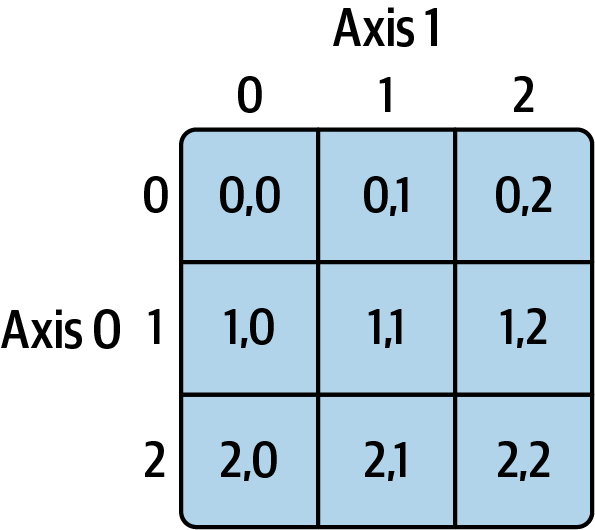
For a multidimensional array A with k many axes, A[1] reveals (the view) of an array with (k-1) axes.
Since it’s just the view, scalar values and arrays can be assigned to A[1] to modify the portion of A.
Similarly, more indices can be used along other axes to further expose different parts of the array. The following returns a vector containing the values whose index starts with 1 and ends with 2.
Imagine axis=0 as a collection of two (5, 3) matrices, namely A[0] and A[1], so that A[1, :, 2] returns the third column (axis=2) of the matrix A[1].
TipThe one rule that makes indexing predictable
An integer index removes an axis; a slice keeps it. Count the integers you typed and subtract:
Note the last line especially. A[1:2] and A[1] select the same data, but the slice retains the axis as a length-1 dimension while the integer drops it. That difference decides whether a later broadcast succeeds.
Indexing with Slices
Basic slicing for one-dimensional arrays works similar to Python lists. The only difference, again, is it’s only a view. Hence, changing the view mutates the original array.
Slicing a multi-dimensional array becomes a bit different. The following example slices an array along the first axis (axis=0), selecting the (2, 3)-sized matrices contained within the range 1:4.
You can mix and match integer indexing and slicing. Predict each shape before you run it.
Trailing axes you do not mention are taken whole, so A[2:] and A[2:, :] and A[2:, :, :] all mean the same thing.
Boolean Indexing
A conditional statement can also be used to select the subset of an array satisfying a condition. Comparison against an array is vectorized and element-wise, returning a boolean array of the same shape.
That boolean array can then be used to index any array of the same shape:
Notice that the result is one-dimensional regardless of the order of A. This is forced on NumPy: the selected positions need not form a rectangular block, so there is no shape to preserve. The count of selected elements is generally not known until run time, which is why a masked selection is always a copy rather than a view.
To modify rather than extract, assign into the masked positions. This form does write back into the original array:
CautionUse
&, |, ~—never and, or, not
Negate a condition with ~ and combine conditions with & (and) and | (or). The Python keywords and, or, not do not work here: they demand a single true-or-false answer from the whole array, and NumPy refuses to guess which one you meant.
The parentheses are not optional: & binds more tightly than > in Python, so A > 2 & A < 7 parses as something quite different and will not do what you want.
Transposing Arrays and Swapping Axes
For a matrix \bold{A} of size (m, n), the transpose \bold{A}^T switches its rows and columns to form a matrix of size (n,m).
In NumPy the attribute .T does the trick—note that there are no parentheses, because it is an attribute rather than a method. Once again, A.T is only a view: it re-labels which axis is which without moving a single number in memory, and A itself is untouched.
The higher-dimensional analog of transpose is swapping axes. For a NumPy array, any two axes can be swapped by using swapaxes(.,.). For a matrix A, it has the same effect as transpose:
More generally, any two axes can be chosen to be swapped.
In NumPy, .T is the special case that reverses all the axes.
Warning
.T on a 1D array does nothing
Reversing a single axis leaves it exactly where it was, so transposing a vector is a no-op:
If you wanted a column, you need an actual second axis—v.reshape(-1, 1) or v[:, np.newaxis], which we take up in 2.4. “Transpose the vector” is a habit imported from linear algebra that NumPy will quietly ignore.